All articles
Blog
WhatsApp Marketing for Clothing Business: How to Turn Enquiries Into More Sales
W
Wonestop Team
Oct 19, 2026 · 10 min read
Wonestop Team
Oct 19, 2026 · 10 min read
Your clothing store is getting views on Instagram. People are liking your latest collection, asking for prices, and checking available sizes.
But how many of those enquiries actually turn into orders?
A customer asks whether a kurta is available in XL. Your team replies three hours later. Another shopper adds a ₹2,499 dress to their cart but never completes checkout.
Meanwhile, your new festive collection goes live, but many previous customers don’t even know about it.
These are everyday problems for clothing businesses. And spending more on advertisements won’t necessarily solve them.
WhatsApp marketing helps clothing businesses turn customer interest into conversations, follow up with potential buyers, automate routine enquiries, and stay connected after a purchase.
Whether you manage a small boutique, an Instagram clothing store, or a growing fashion ecommerce brand, here’s how to make WhatsApp part of your sales process.
WhatsApp marketing for a clothing business means using WhatsApp to connect with shoppers, share product information, promote new collections, answer buying questions, and encourage purchases.
For example, someone discovers a saree on Instagram and wants to know its fabric, available colours, price, and delivery time.
Instead of exchanging several Instagram comments, the customer can continue the conversation on WhatsApp and receive the information needed to make a decision.
For larger clothing stores, the WhatsApp Business API enables additional capabilities such as automated conversations, approved marketing broadcasts, customer segmentation, and ecommerce integrations.
The goal isn’t to send hundreds of promotional messages. It’s to help interested customers buy without unnecessary delays.
Selling clothes online involves more than uploading attractive product photos.
Customers want answers before spending money.
Will this dress fit? Is the colour the same as the picture? Is Cash on Delivery available? Can it arrive before the wedding?
When these questions remain unanswered, customers may leave.
WhatsApp helps clothing retailers address three important challenges:
When used properly, WhatsApp becomes a useful part of the shopping journey rather than just another promotional channel.
Instagram is useful for attracting fashion shoppers, but likes and comments don’t automatically become orders.
Suppose your boutique posts a reel featuring a new Anarkali suit.
Customers start asking:
“Price?”
“Available in M?”
“Can you deliver before Sunday?”
You can guide these enquiries towards WhatsApp through your Instagram profile, website, or Click-to-WhatsApp advertisements.
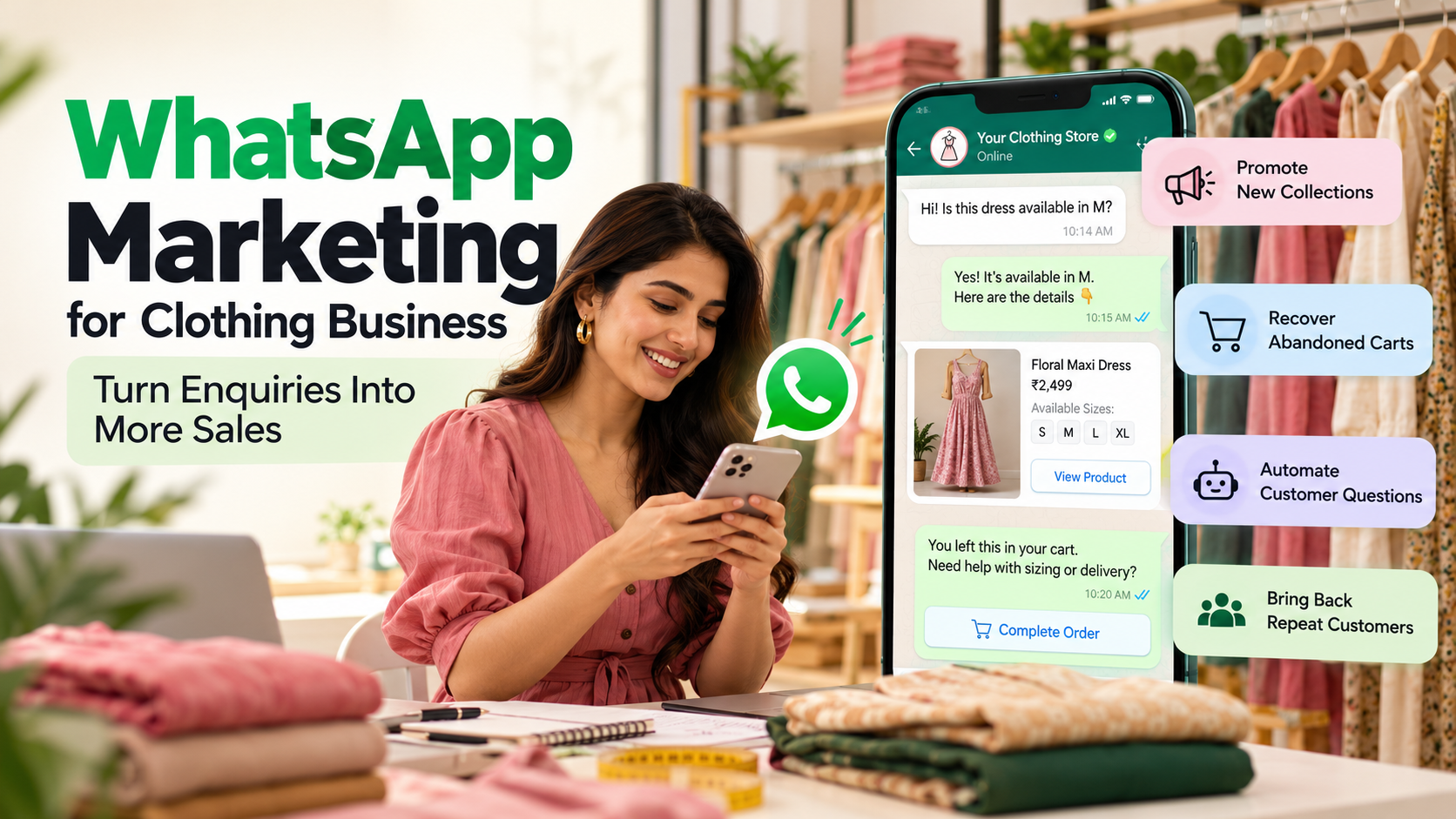
Once the customer messages your store, an automated workflow can collect details such as product interest, size, and budget before connecting them with your team.
Practical tip: Use clear calls to action like “Message us on WhatsApp to check sizes and prices” instead of simply writing “DM for details.”
Imagine you have 2,000 customers in your database.
Some buy sarees. Others prefer western wear, office outfits, or children’s clothing.
Sending the same promotional message to every customer may lead to poor engagement.
A better approach is to organise customers based on their interests and shopping history.
For example, customers interested in ethnic wear can receive festive collection updates, while western wear shoppers receive new dress launches.
Sample WhatsApp message:
“Hi Neha! Our new cotton kurta collection is here. Fresh colours, comfortable everyday styles, and prices starting from ₹999. Have a look: [Collection Link]”
With Wonestop’s WhatsApp Broadcast feature, clothing stores can organise customer lists, personalise campaigns, schedule messages, and manage broadcasts from one dashboard.
Send promotional messages only to customers who have provided the necessary consent, and use approved templates when required.
A customer adds a ₹2,499 co-ord set to their cart but leaves without ordering.
That doesn’t always mean they’re no longer interested.
Maybe they wanted to check the size chart, compare delivery charges, or complete the order later.
A WhatsApp abandoned cart reminder gives them an easy way to return.
Example message:
“Hi Riya! You left a co-ord set in your cart. Need help with the size or delivery details? You can complete your order here: [Checkout Link]”
For Shopify and WooCommerce stores, supported ecommerce integrations can connect shopping events with WhatsApp automation workflows.
A good cart recovery process should stop once the customer completes the order or opts out. Avoid sending repeated reminders that feel pushy.
Related reading: WhatsApp Automation for Ecommerce: Order Updates, Abandoned Carts & Support
Think about how many times your sales team answers the same questions:
“Is this available in XXL?”
“What’s the fabric?”
“Do you offer COD?”
“Can I exchange the product?”
These questions matter to customers, but answering them manually every time can slow your team down.
A WhatsApp chatbot can respond using your configured product information, store policies, and automation workflows.
For example:
Customer: Do you have this kurta in XXL?
Chatbot: Please share the product link or name so I can help you check.
Customer: Blue cotton kurta.
Chatbot: Thanks! Let me check the available information.
If inventory data is connected, the chatbot can use it to check availability. Otherwise, it can transfer the enquiry to your team.
Wonestop offers no-code chatbot and AI chatbot solutions that help businesses manage common customer questions.
Related reading: WhatsApp Chatbot for Ecommerce: Automate Customer Questions and Sales
Many clothing customers prefer Cash on Delivery, especially when purchasing from a new online store.
But incorrect addresses, accidental orders, and refused deliveries can create extra costs.
A WhatsApp confirmation workflow can help customers review their order before dispatch.
Example message:
“Hi Aman! We’ve received your COD order #1254 for the Black Linen Shirt, size L.
Please confirm your order details before we dispatch it.”
Suggested buttons: Confirm Order | Request Change
This won’t eliminate failed deliveries, but it can help your team identify some issues earlier.
A customer loves your floral maxi dress, but size M is unavailable.
Instead of ending the conversation with “Out of stock,” ask whether they’d like to receive an update when it returns.
Once the product is available, send an appropriate notification.
Example message:
“Hi Ananya! Good news. The floral maxi dress you asked about is back in size M. Here’s the link if you’re still interested: [Product Link]”
This works particularly well for popular designs, limited collections, and fast-selling sizes.
Where an alert contains promotional content or starts a business-initiated conversation, use the appropriate consent and approved WhatsApp template.
Once someone places an order, they want to know what happens next.
Has the payment been received? When will the outfit ship? How can they track delivery?
Instead of asking customers to contact support repeatedly, your store can automate relevant order updates.
For example:
“Hi Priya! Your order #1842 has been shipped. You can track your package here: [Tracking Link]”
Connected workflows can also support order confirmations and delivery-related notifications.
Keep transactional messages focused on the customer’s order rather than adding unrelated promotions.
Attracting new shoppers is important, but existing customers can also be interested in your next collection.
Suppose someone purchased a festive kurta last year.
When your new festive collection arrives, you could invite that customer to take a look, provided they have opted in to receive marketing messages.
Example:
“Hi Sneha! Our festive collection is arriving this weekend. Since you’ve shopped our ethnic range before, we thought you’d like an early look. Check it out: [Collection Link]”
You can also create segments for regular shoppers, customers interested in specific categories, or buyers who have requested new-arrival updates.
The key is relevance. Not every customer needs every promotion.
Let’s understand this with a hypothetical example.
Suppose an online clothing store receives 100 WhatsApp enquiries during a month.
| Customer journey | Number |
| Total WhatsApp enquiries | 100 |
| Enquiries with buying intent | 70 |
| Customers receiving relevant product recommendations | 60 |
| Customers completing purchases | 18 |
| Average order value | ₹2,000 |
| Revenue from completed orders | ₹36,000 |
These figures are hypothetical and are not actual Wonestop customer results.
The store’s enquiry-to-purchase conversion rate would be 18%.
Now suppose the business improves response times, provides clearer sizing information, and follows up with eligible customers who abandon checkout.
It can compare the results over time to see whether those improvements increase completed orders.
Track these five measurements:
A delivered WhatsApp message is not a sale. Focus on the actions customers take after receiving it.
Not every clothing boutique needs the WhatsApp Business API immediately.
If you’re managing a small number of customer conversations, the WhatsApp Business App might be enough.
But as your enquiries increase, managing marketing campaigns and customer support manually becomes more difficult.
| Feature | WhatsApp Business App | WhatsApp API with Wonestop |
| Basic customer messaging | Yes | Yes |
| Greeting messages and quick replies | Yes | Through automation |
| Targeted bulk campaigns | Basic broadcast options | Advanced campaigns |
| Ecommerce cart recovery | Manual or limited | Supported integrations |
| Chatbot workflows | Limited | Yes |
| Shared team inbox | Linked-device access | Multi-agent inbox |
| Customer segmentation | Basic labels | Tags, lists, custom fields |
| Advanced automation | Limited | Yes |
For growing clothing brands, the WhatsApp Business API can help manage conversations, campaigns, and automation through one connected system.
Running a clothing business already involves handling stock, product shoots, orders, deliveries, and customer support.
WhatsApp marketing shouldn’t become another complicated task.
Wonestop helps clothing retailers manage customer communication using the official Meta WhatsApp Business Platform.
Here’s how its features connect to common retail challenges:
| Your challenge | Wonestop feature |
| Customers miss new arrivals | WhatsApp Broadcast |
| Too many repeated sizing questions | Chatbot and automation |
| Shoppers abandon checkout | Ecommerce automation |
| Multiple employees handle enquiries | Shared team inbox |
| Customer contacts are disorganised | Lists, tags, and custom fields |
| Campaign performance is difficult to review | Campaign management and reporting |
Wonestop offers a pay-as-you-go messaging model with no monthly subscription fee.
Its published pricing includes:
Check the Wonestop pricing page for current charges and terms before signing up.
You’re already spending time creating reels, running advertisements, updating products, and answering customer messages.
But if enquiries go unanswered or interested shoppers never receive helpful follow-ups, some potential orders may be lost.
Wonestop helps you organise WhatsApp campaigns, automate repetitive communication, and manage customer conversations from one dashboard.
Whether you sell sarees, kurtas, western wear, or everyday clothing, your customers should have an easy way to ask questions and complete purchases.
Explore Wonestop WhatsApp Marketing
Book a Wonestop Demo to discuss the WhatsApp workflows that could suit your clothing business.
Getting more clothing orders isn’t always about attracting more people.
Sometimes, it’s about answering a customer’s sizing question before they leave, reminding someone about an unfinished purchase, or letting previous buyers know when a collection they might like arrives.
That’s where WhatsApp marketing can make a difference.
Start with a few useful workflows. Keep your messages relevant, respect customer preferences, and measure actual orders rather than just message counts.
And when your clothing business needs more than manual messaging, Wonestop can help bring your campaigns, conversations, and automation together.
WhatsApp can help clothing businesses answer product enquiries, promote new arrivals, follow up with interested shoppers, and encourage repeat purchases. Results depend on message relevance, customer consent, product demand, and the shopping experience.
Book a quick demo and we'll get your business live on the official WhatsApp Business API — fast.