All articles
Blog
WhatsApp Username for Business: How to Reserve It in 2026
W
Wonestop Team
Oct 12, 2026 · 12 min read
Wonestop Team
Oct 12, 2026 · 12 min read
Your business has an Instagram username. Your customers can find your website by searching your brand name. But when someone wants to message you on WhatsApp, they often need your phone number or a special chat link.
That’s about to change.
WhatsApp usernames will give customers another way to start conversations with businesses, without needing to know their phone numbers first.
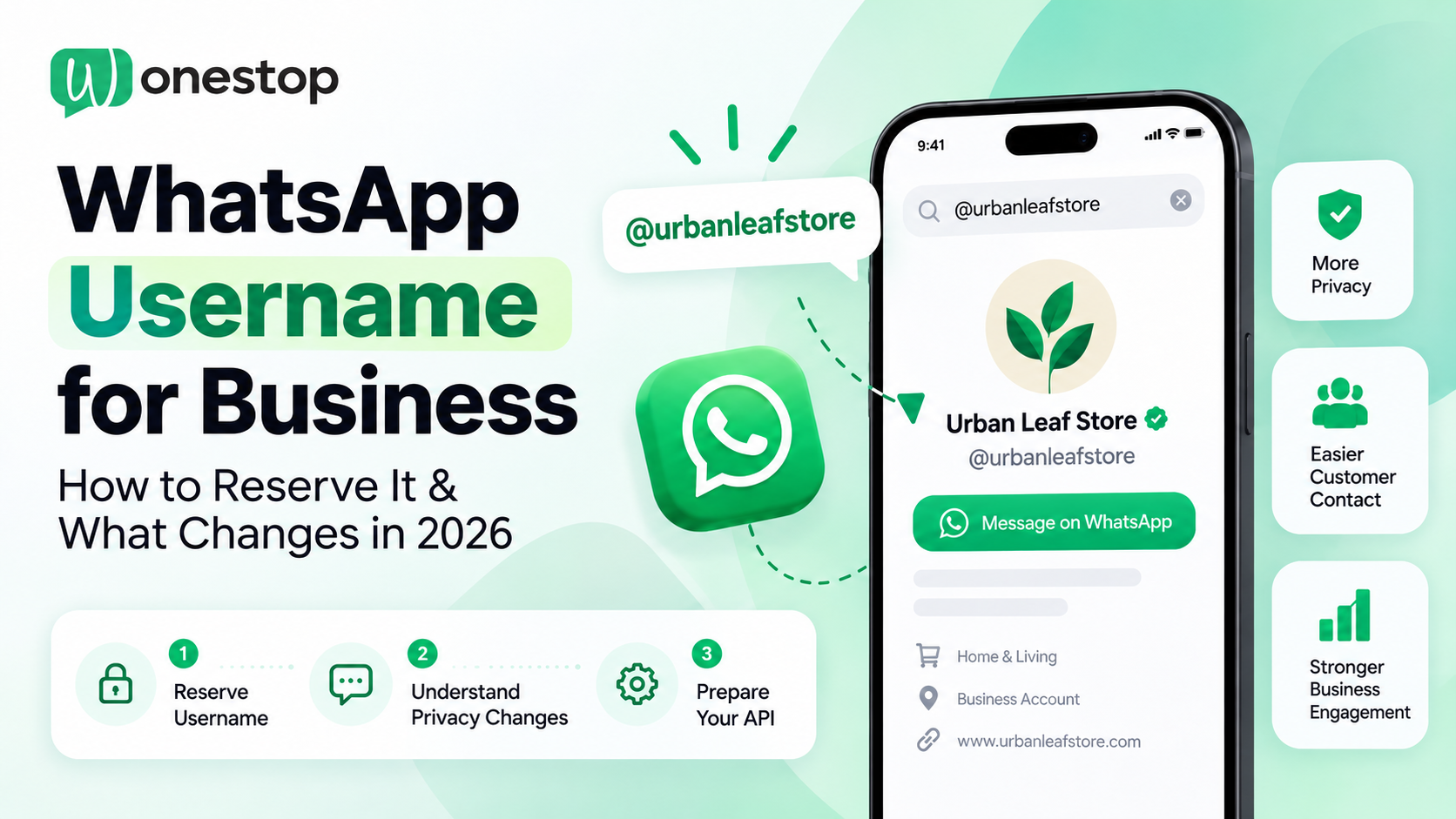
For example, a customer who knows your business as @urbanleafstore could use that same handle on WhatsApp, provided your business has secured and activated it.
Meta announced WhatsApp username reservations on June 29, 2026, allowing users and businesses to claim their preferred names ahead of the wider rollout.
But there is more to this update than choosing a username.
Businesses using the WhatsApp Business API will also need to understand how customer privacy, contact identification, and CRM integrations may change.
This guide covers everything you need to know before WhatsApp usernames become available for your business.
Last updated: October 16, 2026. Username activation is being introduced gradually, and availability may vary by region.
A WhatsApp username is a unique handle associated with your WhatsApp account. It offers another way for people to start a conversation with you.
Think of it as a recognizable name for your WhatsApp account, similar in format to a social media handle.
For example, a business called Urban Leaf Store could use @urbanleafstore, if available.
Customers who know the exact username could contact the business without needing to save or enter its phone number first.
However, your WhatsApp username and display name serve different purposes.
| WhatsApp Display Name | WhatsApp Username |
| Shows the name of your business | Provides a unique handle |
| Can be shared by multiple businesses | Can belong to only one account |
| Example: Urban Leaf Store | Example: @urbanleafstore |
| Appears on your business profile | Offers another way to start a chat |
Creating a username doesn’t remove your registered business phone number. The number remains associated with your WhatsApp account and visible on your business profile.
The main difference is how new customers can reach you.
WhatsApp began accepting username reservations in June 2026, but the feature isn’t being activated for everyone at the same time.
That creates two separate stages:
Username reservation: You secure a name for your WhatsApp account, even if customers cannot use it yet.
Username activation: WhatsApp enables the feature for your account and region, allowing people to contact you through the reserved username.
Meta will notify users when their usernames become available for use.
You can follow the rollout through Meta’s official WhatsApp username announcement.
Indian businesses need to be aware of a regional development.
On July 1, 2026, Reuters reported that Indian authorities had requested a pause in WhatsApp’s username rollout while regulatory consultations took place.
As of this article’s update, we have not confirmed an official announcement lifting that restriction.
If your business operates in India, check the reservation and activation options available in your WhatsApp account before making plans based on the new feature.
Businesses elsewhere should also confirm regional availability rather than assuming that a reservation means the feature is live.
If you’re planning to use your brand name on WhatsApp, start by checking whether it can be reserved.
The process depends on the WhatsApp product your business uses.
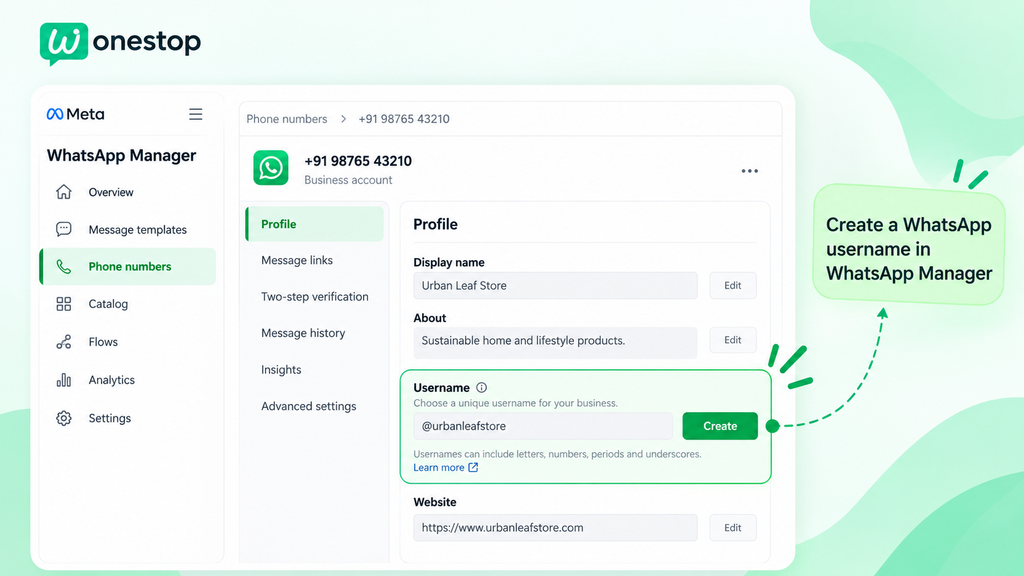
Businesses on the WhatsApp Business Platform can manage username reservations through WhatsApp Manager.
Here’s the process:
If the reservation is accepted, that name is held for your business number.
You can also manage the reservation through Meta Business Suite by selecting your WhatsApp account and editing the relevant phone number’s profile settings.
For the detailed process, refer to WhatsApp’s official business username reservation instructions.
You don’t need the API just to have a WhatsApp username.
If you’re using the WhatsApp Business app, keep it updated and check your account or business profile settings for the username feature.
Follow the instructions shown in your app if the option is available.
Not seeing a username setting doesn’t necessarily mean anything is wrong. It may simply not have reached your account yet.
If you’re unsure which version of WhatsApp is suitable for your business, read our guide on WhatsApp Business API vs WhatsApp Business App.
Before deciding on a handle, check whether it follows WhatsApp’s requirements.
The basic naming rules are:
Uppercase and lowercase letters don’t create separate usernames. However, periods and underscores are treated as distinct characters.
Suppose your business is called Urban Leaf Store.
You might consider:
| Example username | When it makes sense |
| @urbanleafstore | Best match for the brand |
| @urban_leafstore | Alternative if the first name is unavailable |
| @urbanleaf.shop | Another recognizable option |
| @urbanleaf.support | For a separate support number |
These examples have not been checked for availability.
Try to use the name customers already associate with your business.
Avoid adding random numbers or unnecessary words just to secure something quickly.
A simple handle is easier to remember, especially when you’re sharing it in social media posts, packaging, advertisements, or customer support instructions.
Finding your brand name unavailable can be frustrating, especially if you already use it on other social platforms.
But an unavailable username doesn’t always mean another WhatsApp user has claimed it.
Meta protects certain names to reduce impersonation. Some existing Facebook and Instagram usernames are also reserved for their legitimate owners.
If you own the matching handle, you may be able to claim it by linking your accounts and completing Meta’s verification requirements.
Eligibility and ownership verification matter, so approval is not guaranteed.
If another account genuinely owns the name, choose a version that customers can still connect with your business.
Also, think carefully before changing an existing username.
When a business changes or deletes its username, WhatsApp holds the previous name for 60 days, allowing the business to reclaim it during that period.
A change may also mean updating printed materials, online references, and customer instructions.
This update is partly about giving individual users more control over their contact information.
Let’s look at an example.
A customer discovers your store, knows your WhatsApp username, and sends a product enquiry.
If the customer has enabled their own username, WhatsApp may allow them to start that conversation without automatically revealing their phone number.
Your business can still respond, even when it doesn’t receive the number.
However, phone-number privacy depends on the interaction. A number that your business already knows from an earlier contact may remain available under WhatsApp’s applicable rules.
Business accounts are different. Your registered business number remains accessible on your WhatsApp Business profile.
This distinction matters because many companies use mobile numbers to recognize customers, manage support tickets, and connect messages with their CRM records.
You can read more about these privacy arrangements in WhatsApp’s official username FAQ.
A username key is an optional security setting that adds a further requirement for someone contacting an account through its username for the first time.
The person needs to know the exact username and the key.
It offers more control over incoming contact requests, but it also means an additional step for anyone trying to reach you.
Businesses should consider that trade-off when deciding how accessible they want their WhatsApp account to be.
WhatsApp also doesn’t offer a public username directory for browsing unknown accounts. People need to know the handle they’re looking for.
For a small business answering messages directly in the WhatsApp Business app, username adoption may mainly affect how customers initiate chats.
But for companies using the WhatsApp Business API, it has technical implications.
Consider an ecommerce business where every customer is identified by their phone number.
The business might use that number to retrieve order information, assign support tickets, or identify repeat customers.
Now imagine a new customer sends a WhatsApp message through their username without sharing their phone number.
How should the business system recognize that customer?
This is where Meta’s Business-Scoped User ID becomes relevant.
A BSUID is a customer identifier used within the WhatsApp Business Platform.
It supports identifying users in business messaging systems, including situations where usernames are used and phone numbers aren’t available in the same way as before.
It’s important to distinguish three things:
| Identifier | What it does |
| WhatsApp username | Gives people a recognizable way to contact an account |
| Phone number | Supports registration and phone-number-based communication |
| BSUID | Helps compatible business systems identify users |
A BSUID isn’t a public username or a phone number. It serves a technical purpose within Meta’s business messaging environment.
The exact identifiers available in a conversation depend on the interaction and API implementation.
Meta has published developer guidance on WhatsApp usernames and BSUIDs, including changes to webhook processing, API requests, and customer contact information.
Imagine you sell electronics online.
A customer starts a WhatsApp chat and asks:
“Do you have this laptop in stock? And can I get it delivered tomorrow?”
Your support team can answer the product question.
But your existing CRM might normally expect every incoming WhatsApp contact to have a mobile number.
If that information isn’t supplied, an integration that only accepts phone numbers could struggle to create or match the customer record.
A compatible system needs to handle the identifiers provided by Meta, including BSUIDs where applicable.
If the customer later places an order and a delivery phone number is necessary, your business can request the information through an appropriate process.
The customer should understand why the additional information is needed.
This is one reason businesses need to review their messaging systems before assuming their current integrations will work unchanged.
You don’t need to change every WhatsApp workflow immediately.
But if your business uses automation, CRM software, or an integrated support platform, a few checks will help you prepare.
| Area to review | What your team should check |
| Incoming messages | Can your integration process the relevant identifiers in webhook events? |
| CRM records | Can customer records be managed when a phone number isn’t available? |
| Customer history | Can your system connect returning customers with earlier conversations? |
| Automated replies | Do workflows depend on a phone-number field being present? |
| Order and OTP processes | Which steps specifically require customer phone numbers? |
| Contact requests | Can you ask for necessary information without disrupting the conversation? |
For example, a customer asking about delivery charges shouldn’t have to provide a phone number simply to receive a general answer.
But a phone number might become necessary later when the business arranges delivery or verifies an order.
The goal is to request information when it is genuinely needed while keeping customer conversations organized.
Remember, WhatsApp usernames do not remove the platform’s existing rules for marketing messages, customer consent, or approved message templates.
Businesses must continue following the relevant WhatsApp messaging policies.
A recognizable username can make your business easier to contact, but it doesn’t automatically create new customers.
Someone still needs to discover your business through a website, advertisement, social media page, referral, or another channel.
Once your username is active, you can share it where customers already interact with your brand.
For example, a retail store could include its handle in Instagram content or customer information materials.
But getting a message is only the beginning.
If a customer asks about stock availability and waits all day for an answer, the username hasn’t solved the real communication problem.
Businesses also need a reliable way to receive, organize, and respond to customer conversations.
That’s where a WhatsApp shared inbox and WhatsApp automation can be useful.
They help teams manage enquiries, automate common tasks, and keep customer communication organized.
WhatsApp usernames may introduce a new contact method, but businesses will still need to manage sales enquiries, support questions, order updates, and customer follow-ups.
Wonestop helps businesses handle these communication needs through the official WhatsApp Business API.
With Wonestop, teams can manage incoming chats through a shared inbox, automate common responses, organize customer conversations, and connect WhatsApp with business workflows.
As Meta continues introducing usernames and BSUIDs, businesses should also review the compatibility of their current API and CRM integrations.
BSUID support and specific username-related workflows should be confirmed with the technical team or platform provider before implementation.
Want to make WhatsApp conversations easier to manage as your business grows?
Explore Wonestop’s WhatsApp Business API and book a demo to discuss your customer communication, automation, and integration needs.
WhatsApp usernames introduce a useful change in how people contact businesses.
Customers get another way to start a conversation, while individuals have more control over when they share their phone numbers.
For businesses, the immediate priorities are straightforward: check username availability, secure a recognizable handle where possible, and understand what the change means for customer communication.
If you rely on the WhatsApp Business API, it’s also worth reviewing how your messaging tools identify and manage customers.
Because a username might make your business easier to contact.
But a good customer experience still depends on how you handle the conversation that follows.
Yes. Meta opened username reservations in June 2026. However, reservation and activation depend on regional and account availability. Check the username settings available to your WhatsApp account.
Book a quick demo and we'll get your business live on the official WhatsApp Business API — fast.